
Take back the internet!
We had a good run....
but unfortunately Development and support has ended on SafariAdblocker :(
About


- Safari AdBlocker - the 64 bit Universal adblocker
- Safari AdBlocker supports the use of AdBlock Plus subscriptions (url's with the prefix "abp:") - and will be updated automatically, each week
- For a list of current AdBlock Plus subscriptions, head on over to: http://adblockplus.org/en/subscriptions
Version 1.9.1+ Updates
- The Backend to SAB has changed quite dramatically, if experiencing performance issues; try Reseting Safari then logging out of OS X, and log back in.
!Important
- !!Safari Adblocker is NOT currently compatible with versions of Safari 5 and greater!
- There are known compatibility issues with Saft, and SafariStand. You may need to uninstall these first, before installing Safari AdBlocker. However your mileage may vary...
- Safari Adblocker requires SIMBL which is conveniently included in the installer.
Main Features
- Adblock Plus subscription support
- Convenient contextual menu to enable/disable
- Right-click to block/whitelist site's, url's, images, and frames
- Pattern matching courtesy of RegexKit
- Automatic updating courtesy of Sparkle
Donate
- Please consider giving a donation, to help with development costs.
- Its really up to you what you think Safari Adblocker is worth - personally i think a donation of $10 - $15 is a fair amount.

Download
History
- Jan 22, 2011 - Version 1.9.8.7 - Fix for CPU spike when feed is unavailable, fix for a rare case when trying to select a style sheet which Safari is already configured to use, updated included SIMBL to v0.98d
- July 07, 2010 - Version 1.9.8.6 - Spanish localization, thanks Jorge Rodr�guez (A.K.A. Tiriel)
- June 11, 2010 - Version 1.9.8.5 - Italian localization, thanks Rosario C.
- June 9, 2010 - Version 1.9.8.4 - Dutch localization, added element whitelisting, fix for some abp whitelist rules being ignored
- May 30, 2010 - Version 1.9.8.3 - another fix for over-agressive blocking, fix crash when removing feeds..., fix build version not being displayed (German version), fix for user whitelisting, thanks dinkypumpkin
- May 23, 2010 - Version 1.9.8.2 - fix for over-agressive blocking, fixed user filters, fixed style sheet implementation
- May 18, 2010 - Version 1.9.8.1 - code optimization, fixed site-whitelisting...
- May 13, 2010 - Version 1.9.8 - fixed ad-blocking regression
- May 12, 2010 - Version 1.9.7 - fixed WebKit nightly support, fixed abp rule support, fixed some memory leaks, fixed error log messages, fixed crash when removing feeds
- May 11, 2010 - Version 1.9.6 - matching now handled by RegexKit, better collapsing of blocked elements
- May 5, 2010 - Version 1.9.5 - Fix some crashes relating to updating subscriptions, optimised code
- May 5, 2010 - Version 1.9.4 - Speed improvements (code optimisations, moved reading of abp filters into its own thread), SAB overrides any Safari user Style Sheets, so style sheet can now managed in SAB, fix a potentially lethal crash if a feed somehow gets saved without a url, or date, fix a potentially lethal crash if adding manual filters strating with "." or "#", fix for overriding font-settings on "View Source" Window, fix for overriding font-settings on inline dictionary, fix for trying to add duplicate feeds, fix for adding non-valid feeds, fix for multiple-feed elements not being blocked, fix for random crash on some urls, fixed some memory leaks
- April 18, 2010 - Version 1.9.3 - More performance tweaks
- April 18, 2010 - Version 1.9.2 - Performance tweaks
- April 18, 2010 - Version 1.9.1 - Portugese localisation - thanks Thiago Sian, Chinese localisation corrections - thanks Lei Feng, more efficient element blocking, performance improvements, contextual menu option to toggle SAB and reload page
- April 12, 2010 - Version 1.9 - Chinese localization, French localization, thanks Pierre-Emmanuel Celotto, Fixed some ads not being blocked, Merged elements into a single database, Moved download error messages the into log file, Fixed crash when updating if no subscriptions selected in german localization
- March 31, 2010 - Version 1.8.6 - Fixed site-whitelisting
- March 30, 2010 - Version 1.8.5 - Russian localization - thanks Aleksey Kirpichnikov
- March 30, 2010 - Version 1.8.4 - Fix for over-zealous blocking, Fix for ignoring of user filters, Hopefully fixed an incompatability with SafariBlock
- March 26, 2010 - Version 1.8.3 - Improved abp rule support, code optimisation
- March 22, 2010 - Version 1.8.2 - Fixed an incomatabilty with Leech, thanks to Peter Maurer
- March 18, 2010 - Version 1.8.1 - Fixed adblocking on youtube videos, optimised ad matching
- March 15, 2010 - Version 1.8 - Basic support for element blocking, fixed ads some not being blocked (apparent in many RSS feeds) thanks to 911mxl for finding this!, improved site whitelisting, included manual uninstall script in download
- March 03, 2010 - Version 1.7.3 - Fixed crash when adding an empty filter, Fixed Safari hang/high CPU use when encountering "data:" url's, Fixed contextual menu implementation, New toolbar icon - Inspired by a design submitted by Robert Wolf.
- February 19, 2010 - Version 1.7.2 - Finnish localization (thanks to Paula-Christiina Wirtanen), fixed name parsing for FanBoy subscriptions, fixed Installer Info spelling mistake, UI tweaks
- January 14, 2010 - Version 1.7.1 - fixed update crash if no subscriptions are selected, removed necessity for at least one subscription, hopefully fixed SIMBL installer (for 32bit intel)
- January 13, 2010 - Version 1.7 - multiple subscription support, German localization - thanks Michael Moch, fixed memory leaks, better subscription support, fixed tab changing bug when clicking enable/disable button, fixed bug when enabling/disabling from context menu, that Enable/Disable button wont reflect true value, UI tweaks, code optimizations, fixed some strings, moved subscriptions info to ~/Library/Application Support/Safari AdBlocker/Subscriptions.plist
- December 20, 2009 - Version 1.6 - changed default subscription to EasyPrivacy+EasyList, better subscription filter support, preliminary beta support for second subscription - add file Subscription2.txt into folder: ~/Library/Application Support/Safari AdBlocker/
- December 19, 2009 - Version 1.5 - better AdBlockPlus filter support, fixed remembering tab state when changing preference Panes, removed some unneeded code
- December 12, 2009 - Version 1.4 - added uninstaller, updated About panel, added manual filter sorting, added info file to installer, UI tweaks
- December 11, 2009 - Version 1.3.1 - fixed Info panel details
- December 10, 2009 - Version 1.3 - added basic support for whitelisting an entire site, added option to enable/disable contextual menus
- December 09, 2009 - Version 1.2.1 - really fixed CMD-z bug, cleaned some unnecessary code
- December 08, 2009 - Version 1.2 - removed Flash specific code, use ClicktoFlash instead
- December 07, 2009 - Version 1.1.2 - fixed SIMBL Installer permissions, fixed bug - fixed remembering last opened tab, added ads blocked total/session, fixed bug where using the modifier keys CMD-z would open Preferences
- October 29, 2009 - Version 1.1.1 - added contextual menu option to enable/disable Safari AdBlocker when right-clicking on flash elements, fixed bug - when exporting filters after manually adding (new filters would not be exported, added ads blocked total/session, removed unnessesary code
- October 26, 2009 - Version 1.1 - added contextual menu option to enable/disable Safari AdBlocker, added contextual menu option to block url's, added contextual menu item to Whitelist url, image, frame and Flash. added option to update subscription weekly, added option to export filters, changed subscriptions file name to "Subscription.txt", removed a lot of console debug errors
- October 24, 2009 - Version 1.0.1 - fixed Leopard support, fixed automatic downloading of default subscription on first run, fixed subscriptions/filters not being saved, fixed "update now" button
- October 24, 2009 - Version 1.0 - Initial release
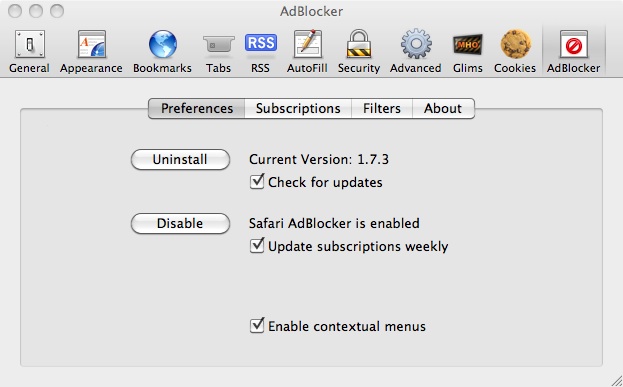
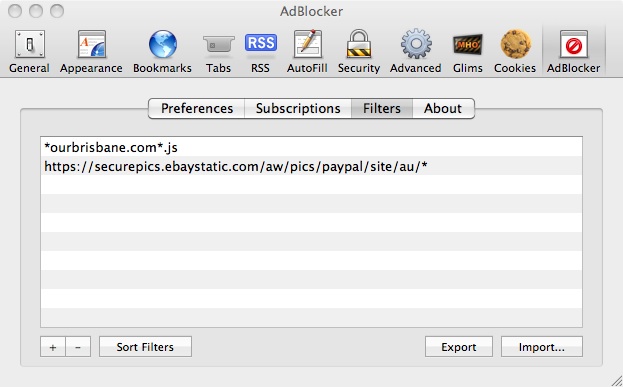
Screenshots

Usage notes
- Install Safari AdBlocker from the installer, and access preferences through Safari's preference menu.
Whitelisting
- To whitelist an object, use the convenient contextual menu, or alternatively manually add your filter and prefix it with "@@"
e.g: to whitelist the url http://www.apple.com
add the following to your filters:
@@http://www.apple.com - To whitelist 'all' ads for a particular site, use the contextual menu, or manually prefix your filter with "@@|"
e.g: to whitelist all ads on the site http://macupdate.com, use:
@@|http://macupdate.com - **Note: whitelisting an object, overides all the block settings!
Element Blocking
- Currently, only global element blocking rules are honoured. Site-specific rules are ignored. To block an element, manually add a filter and prefix it with "##"
- e.g to block the element: div "id"="sponsored_ads"
- add the following to your filters:
- ###sponsored_ads
- likewise: div "class"="sponsored_ads"
- ##.sponsored_ads
- ***Note: use "#" for element id's, and "." for element classes
System Requirements
- Mac OS X 10.5+
- For pre leopard adblocking management, use SafariBlock
Installation Info
- Safari Adblocker requires SIMBL, and is installed into the folder /Library/Application Support/SIMBL/Plugins/
- All of Safari Adblocker preferences are stored as keys in Safari's preference file ~/Library/Preferences/com.apple.Safari.plist (with the prefix "AdBlocker")
- Subscriptions are saved to the file ~/Library/Application Support/Safari Adblocker/Subscription.txt
- Manually configured filters are saved to the file ~/Library/Application Support/Safari Adblocker/Filters.plist
Manual Uninstall
- Delete the folowing file/folder:
- /Library/Application Support/SIMBL/Plugins/Safari AdBlocker.bundle
- ~/Library/Application Support/Safari Adblocker/
- Alternatively, download, and run the following script: Uninstall Safari AdBlocker.zip (233kb)
Credits
- Safari Adblocker was built using source code from SafariBlock (Apache 2.0 license), and uses SIMBL to inject code into Safari.
Google Code
- Source-code is available here under the Apache License, Version 2.0